

Can You Put a Card Reader on Any Vending Machine? The Complete Compatibility Guide
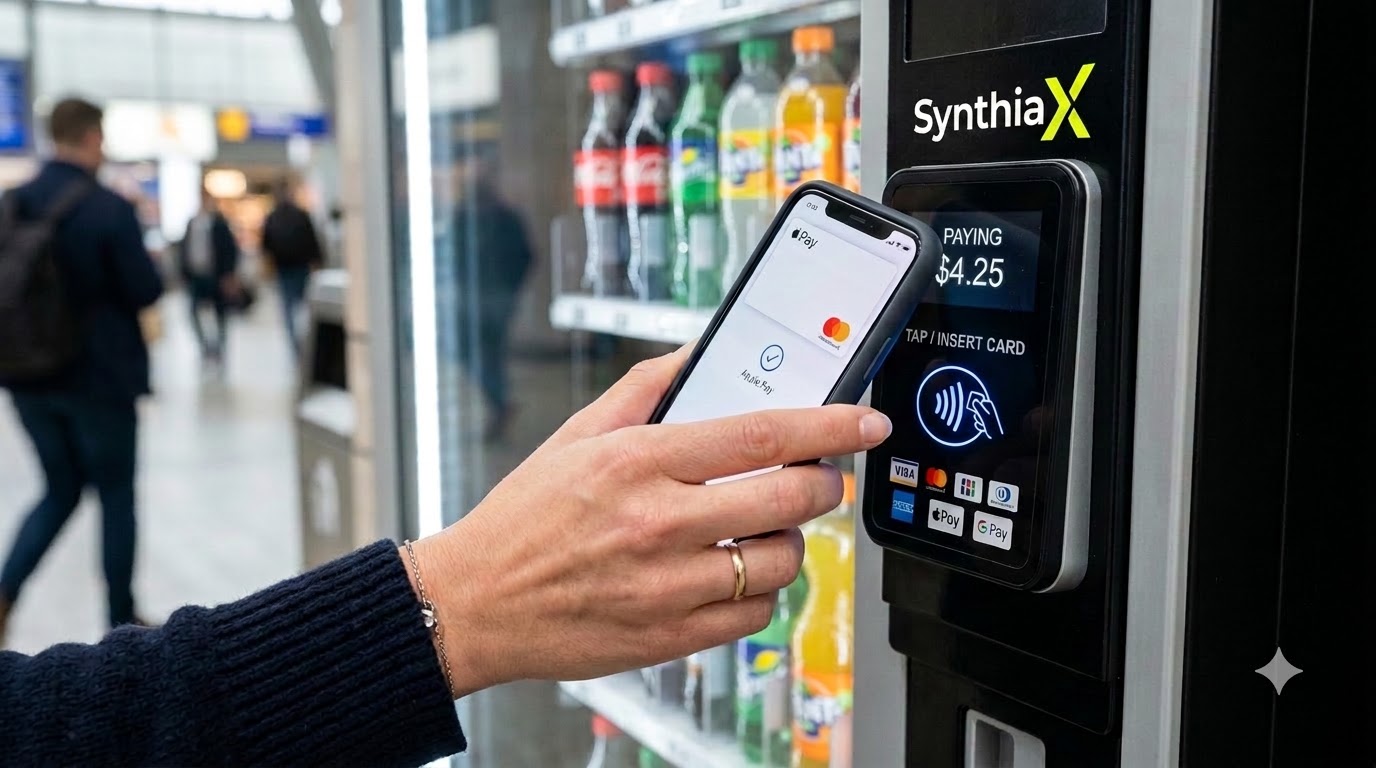
The answer is yes, you can install a card reader on almost any modern electronic vending machine. If your machine supports the Multi-Drop Bus (MDB) standard, adding a cashless payment unit takes less than thirty minutes. Even older, non-MDB legacy machines can usually accept a cashless device with a simple controller upgrade kit or an MDB conversion harness. Only purely mechanical, non-electric machines (such as classic coin-crank gumball dispensers) cannot support a standard digital payment terminal without extensive custom hardware modifications.
The modern consumer rarely carries pocket change. Whether people are grabbing a cold drink at an office park, buying a snack at a hospital, or purchasing personal care items at an airport, they expect to tap a credit card or wave their smartphone. Because of this shift, adding a card reader for vending machine operations has transformed from an optional luxury into a business necessity.
Operators who integrate advanced telemetry and payment platforms, such as SynthiaX, routinely report dramatic revenue growth, smoother daily routes, and lower operational overhead.
In this comprehensive guide, we break down everything you need to know about compatibility, technical requirements, step-by-step installation, and real-world results when upgrading your fleet.
What to Look for Before Buying a Card Reader for Vending Machine Retrofits
Before you purchase hardware, evaluate your equipment to ensure a seamless upgrade. While most machines manufactured over the last twenty-five years support cashless technology, checking a few technical specifications beforehand prevents costly delays.
1. The Internal Communication Protocol (MDB vs. Non-MDB)
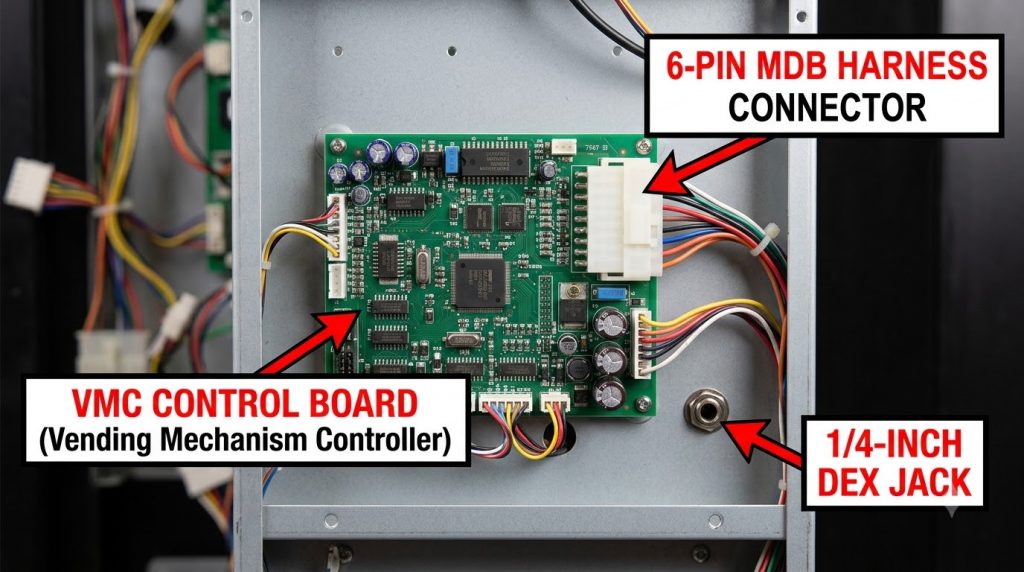
The universal language of modern automated retail is the Multi-Drop Bus (MDB) protocol. Developed by the National Automatic Merchandising Association (NAMA), MDB allows the vending machine controller (VMC) to communicate seamlessly with bill validators, coin changers, and cashless payment devices.
- MDB Machines (Standard): Look for a 6-pin white or black connector running from the main logic board inside the door. If your machine features this harness, it will readily communicate with a modern card reader for vending machine setups.
- Non-MDB / Micromech / Pulse Machines (Legacy): Older machines built in the 1980s or 1990s often rely on 9-pin, 12-pin, or 15-pin harnesses. To connect a card reader for vending machine systems on these units, you must install an MDB conversion controller board (such as an InOne upgrade board) to translate legacy signals into standard MDB data.
2. VMC Firmware Level
Your Vending Machine Controller (VMC) must run firmware that recognizes cashless peripherals. For standard credit card processing, your VMC should support MDB Level 2 or Level 3 cashless communication.
If your machine has an early firmware version, it may fail to display pre-authorization balances or multi-vend prompts. In most cases, updating the firmware chip or swapping in a modern control board resolves this limitation immediately.
3. DEX Port Availability for Telemetry
A cashless terminal does more than process debit and credit cards; it also functions as a powerful data transmitter. The Data Exchange (DEX) port, which looks like a standard 1/4-inch headphone jack or a 3-pin Molex plug—streams inventory, cash intake, and diagnostic data directly to your payment gateway.
When you install a card reader for vending machine management, connecting the DEX cable enables real-time sales reporting and automated restock alerts.
4. Physical Knockout Space and Mounting Dimensions
Examine the exterior fascia of your vending machine. Most commercial snack, drink, and combo units feature a standardized rectangular opening known as the NAMA standard knockout.
- If your machine has this knockout plate, simply unscrew the blank panel and mount the external swipe/tap bezel directly over the opening.
- If your machine lacks a standard opening (common on vintage cold-drink machines), you can use an external mounting bracket or drill a small pilot hole to route the communication cables securely through the chassis.
5. Reliable Cellular Network Coverage
Modern cashless terminals transmit transaction data over encrypted 4G LTE and 5G IoT cellular networks. Check the mobile signal strength at your machine’s physical location. Basement locations, heavy industrial warehouses, and thick concrete parking structures may require an extended high-gain antenna to ensure that every card reader for vending machine deployment processes card swipes in under two seconds.
How to Install a Card Reader for Vending Machine Systems: Step-by-Step
Installing a modern payment unit is straightforward and typically takes 15 to 30 minutes per machine. Follow this step-by-step procedure to equip your equipment with digital payment hardware safely and correctly.
+-------------------------------------------------------------------------+
|                  FIVE-STEP INSTALLATION WORKFLOW                         |
+-------------------------------------------------------------------------+
|  [Step 1] Power Down the Machine Completely                             |
|       |                                                                 |
|  [Step 2] Mount the Bezel and Cellular Antenna                          |
|       |                                                                 |
|  [Step 3] Connect MDB & DEX Harnesses to the VMC                        |
|       |                                                                 |
|  [Step 4] Power On the Machine & Configure Price Settings                |
|       |                                                                 |
|  [Step 5] Run Test Transactions & Activate Cloud Portal                 |
+-------------------------------------------------------------------------+
Step 1: Power Down the Machine Completely
Always switch off the main power switch and unplug the vending machine from the wall outlet before opening the cabinet. Connecting or disconnecting live MDB cables can cause an electrical short that permanently damages the main VMC board.
Step 2: Mount the Reader Bezel and External Antenna
- Remove the protective metal plate from the front NAMA knockout window.
- Position the exterior bezel of the card reader for vending machine over the opening.
- Fasten the mounting studs securely from the inside using the provided locking nuts.
- Mount the cellular antenna on top of the cabinet (drilling through a top grommet or routing through the back hinge) to ensure clear line-of-sight signal reception.
Step 3: Connect the MDB and DEX Wiring Harnesses
Connect your reader’s wiring harness into the machine’s internal communication loop:
- MDB Connection: Locate the 6-pin MDB daisy chain running between the control board, the bill acceptor, and the coin mechanism. Plug the card reader for vending machine directly into this series.
- DEX Connection: Insert the DEX data harness into the DEX socket on the control board or bill validator.
- Telemeter Unit: Secure the telemeter (the internal cellular processing brain) to an interior sidewall using magnetic mounting pads or industrial velcro.
Step 4: Power Up and Configure VMC Cashless Parameters
Plug the machine back into the wall outlet and switch on the main power. The card reader for vending machine will illuminate and initialize its network handshake.
Enter the machine’s internal service menu to confirm that the VMC recognizes the cashless peripheral. Depending on your model, enable the following settings:
- Force Vend: Prevents users from using the machine as a change maker.
- Multi-Vend: Allows customers to make multiple selections on a single tap.
- Two-Tier Pricing: Enables differential pricing for cash versus credit cards to offset processing fees.
Step 5: Run Test Transactions and Sync with SynthiaX
Perform a series of test transactions using an EMV chip card, a contactless credit card, and a mobile wallet (Apple Pay or Google Pay). Verify that the transaction authorizes instantly, the product drops reliably, and the digital receipt generates correctly.
Finally, log into your SynthiaX cloud management dashboard to assign the machine ID, configure custom price tiers, and activate remote inventory monitoring.
Upgrading a 35-Machine Route with SynthiaX
The Challenge
Apex Automated Refreshments operated a route of 35 vending machines across suburban office parks, community colleges, and manufacturing centers in Ohio. Over 60% of their equipment consisted of older Crane National 147 snack machines and Dixie Narco 501E drink machines.
Despite consistent foot traffic, total revenue had dropped by 22% over a two-year period. Route drivers frequently reported that potential buyers walked away after discovering that the machines only accepted dollar bills and coins. Apex needed a dependable card reader for vending machine deployment to modernize their fleet without spending tens of thousands of dollars replacing functional hardware.
The Solution
Apex partnered with SynthiaX to retrofit all 35 machines with high-speed cashless terminals and intelligent telemetry modules. For their 12 legacy non-MDB units, they installed universal MDB conversion kits, allowing the newer SynthiaX hardware to communicate with the older logic boards.
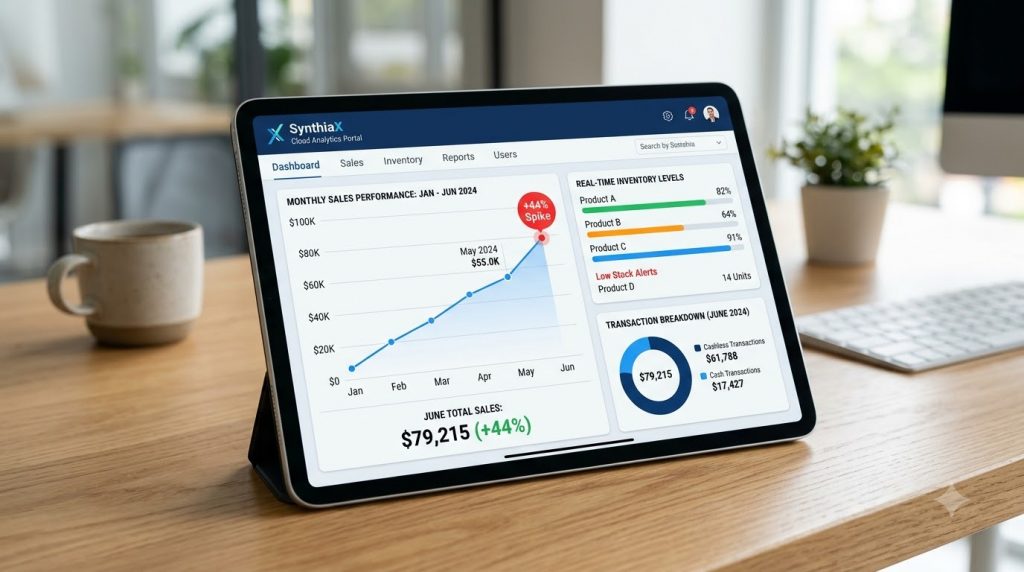
Every machine received a rugged, weather-resistant card reader for vending machine bezel capable of processing EMV contact chips, NFC mobile payments, and traditional magnetic stripes. The entire fleet was connected to the central SynthiaX cloud analytics portal to give the operations team live visibility into daily route performance and machine health.
The Results
Within 90 days of completing the upgrade, Apex recorded substantial gains across every key business metric:
- 44% Increase in Total Monthly Revenue: Gross route earnings jumped from $14,200 to $20,448 per month.
- Higher Average Transaction Value (ATV): Multi-vend functionality and cashless payments boosted the average spend per customer from $1.35 to $2.15.
- 67% Cashless Adoption Rate: Over two-thirds of all customers chose credit cards or mobile wallets over cash within the first month.
- Streamlined Inventory and Routing: Real-time DEX telemetry through the SynthiaX dashboard cut weekly restocking trips by 30%, saving hundreds of dollars in fuel and driver labor.
- Rapid Return on Investment: Apex fully recouped the cost of their card reader for vending machine hardware in just 78 days.
Frequently Asked Questions (FAQ)
Can I install a card reader for vending machine units that lack digital screens?
Yes. Most cashless bezels feature their own integrated OLED or LCD display screens. Even if your older vending machine only has a mechanical price wheel or a simple numeric LED segment, the external display on the card reader for vending machine guides the customer through the swipe, authorization, and vend process clearly.
What monthly fees are associated with a card reader for vending machine operation?
Operating a cashless terminal typically involves two costs:
- A Monthly Cellular/Telemetry Fee: Usually between $5.00 and $10.00 per machine per month to cover the 4G/5G data connection and cloud dashboard access.
- Transaction Processing Fees: Typically a flat rate ranging from 4.5% to 5.95% per swipe (or a blended rate like 2.5% + $0.10).
Many operators implement a two-tier pricing model (adding a $0.10 to $0.15 surcharge on cashless sales) to offset these processing expenses completely.
What should I do if my vending machine lacks an MDB connection?
If your machine uses older mechanical switches or early pulse harnesses, you do not need to discard it. You can purchase an MDB retrofit kit (such as an upgraded controller board). This board installs between the cabinet wiring and the machine logic, providing a standard MDB port so you can connect any card reader for vending machine effortlessly.
Does a card reader for vending machine keep working during intermittent cellular drops?
Top-tier payment devices feature local memory caching and intelligent retry logic. If the cellular connection drops briefly, the terminal attempts reconnection and immediately alerts the operator via the management dashboard. For high-security environments with spotty wireless reception, high-gain external antennas solve signal bottlenecks reliably.
Modernize Your Vending Business Today with SynthiaX
Upgrading your vending machines with digital payment terminals is the fastest and most cost-effective way to boost route revenue, capture impulse buyers, and automate your daily route operations. Today’s consumers simply do not carry cash, and every cash-only machine on your route is losing sales every single day.
Whether you run a single drink machine at a local business or manage an enterprise fleet across several states, choosing the right card reader for vending machine deployment will transform your bottom line.
SynthiaX delivers an all-in-one cashless platform engineered for high reliability, low processing fees, and real-time telemetry tracking.
- Instant plug-and-play MDB compatibility
- Next-generation tap, chip, and mobile wallet processing
- Live inventory management and automated restock alerts
- Industry-leading hardware reliability and low transaction rates
Ready to maximize your route profits? Contact SynthiaX today to order your plug-and-play upgrade kits and bring cashless convenience to all your vending machines.