

How Do Card Readers Work? The Complete Guide to Cashless Fleet Hardware
Cashless payments dominate modern commerce. From automated retail kiosks and office coffee stations to traditional snack machines, consumers expect fast, secure, digital transactions. But how exactly do these payment terminals operate behind the glass and metal?
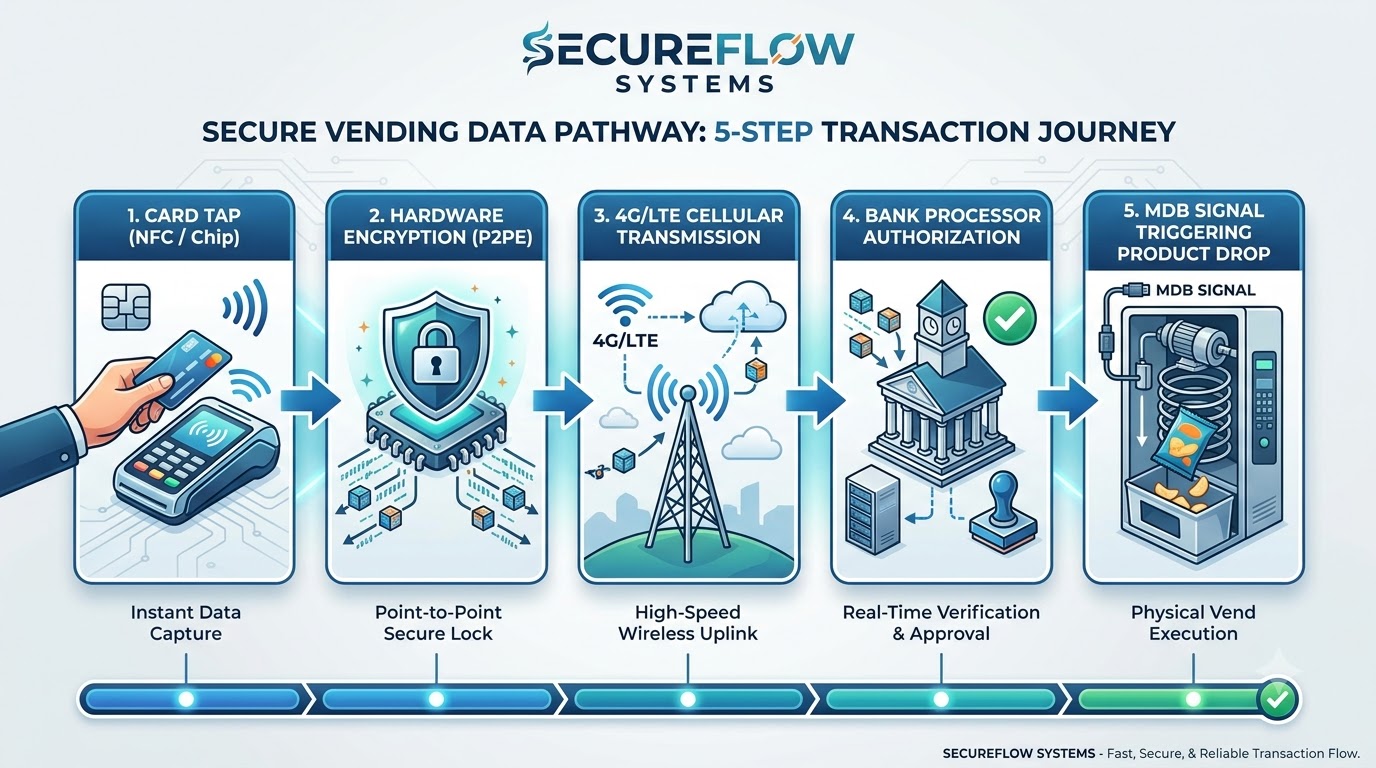
Modern card readers capture sensitive payment information from a credit card, debit card, or smartphone wallet using magnetic stripe, EMV chip, or Near Field Communication (NFC) technology. The device immediately encrypts this account data at the hardware level and transmits it over a secure cellular or Wi-Fi network to a payment processor. The processor routes the transaction through card networks to the issuing bank, which verifies account validity and fund availability. Within two to three seconds, an authorization message travels back to the terminal, triggering the machine controller to dispense the selected item or service.
For operators managing self-service equipment, unattended card readers are no longer optional accessories. They serve as the central nervous system of modern automated retail. Premium platforms like SynthiaX now combine swift transaction processing with real-time route telemetry, allowing operators to scale their fleets efficiently.
Understanding how card readers work, how to install them, and how top hardware providers compare will help you maximize uptime and protect your profit margins.
How Do Card Readers Work Behind the Scenes?
To understand how card readers operate, you must examine both the hardware interactions at the physical interface and the cloud-based data workflows that finalize the sale.
+-------------------------------------------------------------------+
|                     HOW A CARD READER WORKS                       |
+-------------------------------------------------------------------+
|  1. Payment Capture     Customer taps/inserts card via NFC or EMV |
|         v                                                         |
|  2. Encryption          Terminal encrypts data (P2PE/Tokenization)|
|         v                                                         |
|  3. Data Transmission   Reader sends payload over 4G/LTE cellular |
|         v                                                         |
|  4. Cloud Clearing      Payment processor & issuing bank approve  |
|         v                                                         |
|  5. Machine Vend        MDB signal fires; controller drops product|
+-------------------------------------------------------------------+
Every cashless purchase follows a coordinated sequence across hardware, firmware, cellular infrastructure, and global financial networks.
1. Data Capture Across Multiple Physical Interfaces
The customer begins the transaction by presenting a payment credential to the terminal. Modern unattended card readers accept payment information through three distinct methods:
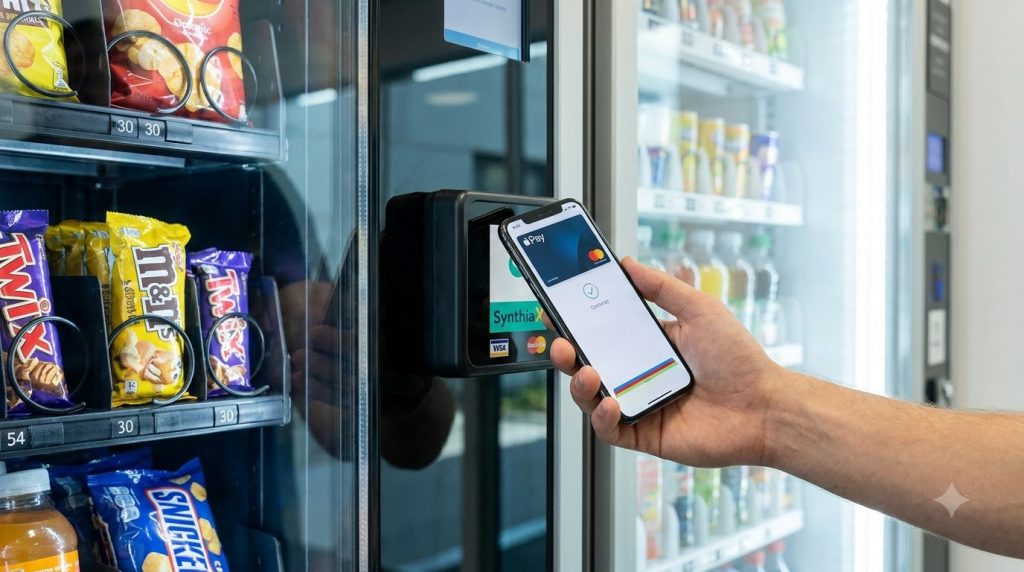
- Near Field Communication (NFC): Contactless payments rely on short-range high-frequency radio waves operating at 13.56 MHz. When a customer brings a contactless card, Apple Pay, or Google Wallet within four centimeters of the reader, the terminal powers a tiny radio-frequency antenna inside the card or smartphone. The devices exchange cryptographic tokens almost instantaneously.
- EMV Chip Insertion: EMV (named after Europay, Mastercard, and Visa) uses a microchip embedded directly in the card. When inserted into the slot, physical pins contact the chip pads, establishing a direct electrical circuit. The chip creates a unique dynamic transaction code that cannot be duplicated or reused.
- Magnetic Stripe Swiping: The magnetic stripe contains microscopic iron particles aligned in three distinct data tracks. Swiping the card past a magnetic read head induces an electrical voltage that converts into binary account numbers. Because magnetic stripes use static numbers vulnerable to skimming, modern card readers prioritize EMV and contactless methods.
2. Instant Hardware Encryption and Tokenization
Security begins the microsecond data enters the device. Unattended card readers employ Point-to-Point Encryption (P2PE).
The reader’s secure microprocessor encrypts the Primary Account Number (PAN) directly inside a tamper-resistant hardware security module (HSM). If a malicious actor intercepts the external wires of the device, they capture only unreadable ciphertext.
Alongside encryption, payment architectures utilize tokenization. The card reader replaces the actual account number with a randomized surrogate value, known as a token. This token travels through external systems without exposing core financial credentials to theft.
3. Wireless Data Transmission via Telemetry
Vending machines and automated kiosks typically lack access to hardwired local office networks. Consequently, unattended card readers incorporate integrated cellular modems that leverage 4G LTE or 5G networks.
The device bundles the encrypted payment payload and transmits it over an encrypted cellular connection to an acquiring payment gateway. In commercial machines, this communication module also acts as a telemetry unit, sending machine health diagnostics, internal cabinet temperatures, and inventory counts alongside financial data.
4. Clearinghouse Routing, Verification, and Settlement
Once the encrypted packet reaches the payment gateway, the automated banking sequence occurs:
- Gateway to Processor: The gateway unbundles the packet and routes the encrypted transaction to the merchant acquirer.
- Card Brand Interchange: The acquirer sends the transaction details through Visa, Mastercard, American Express, or Discover network switches.
- Issuing Bank Evaluation: The bank that issued the customer’s card checks the account for sufficient funds, confirms that the card is not reported stolen, and runs fraud-detection algorithms.
- Authorization Code Generation: If all criteria pass, the bank issues a short authorization approval string and reserves the transaction amount.
This intricate global communication loop takes between one and three seconds to complete.
5. The MDB Handshake and Product Dispense
The transaction approval returns over the cellular link to the terminal. At this point, the hardware interacts directly with the internal computer of the host machine using the Multi-Drop Bus (MDB) protocol.
The card reader functions as an MDB peripheral, akin to a bill validator or coin mechanism. It signals the machine’s Vending Machine Controller (VMC):
- The reader transmits an authorization balance to the VMC.
- The customer presses their product selection on the machine keypad.
- The VMC verifies that the price matches or sits below the authorized credit.
- The VMC activates the dispensing motor or spiral drive.
- A drop sensor verifies that the product dropped into the bin.
- The VMC sends a final success signal to the reader, which reports the completed sale back to the cloud to close the transaction.
If the product fails to drop, the machine controller cancels the charge, preventing customer disputes and chargebacks.
How to Install Card Readers on Your Machines: A Step-by-Step Guide
Installing card readers on unattended machines is a straightforward task that requires basic hand tools and strict adherence to electrical safety procedures.
+-------------------------------------------------------------------+
|               CARD READER INSTALLATION CHECKLIST                  |
+-------------------------------------------------------------------+
| [ ] 1. Power off machine at the main breaker                     |
| [ ] 2. Remove knockout plate or drill standard mounting holes    |
| [ ] 3. Mount exterior faceplate and secure internal locknuts      |
| [ ] 4. Connect MDB harness in-line with bill validator/coin mech  |
| [ ] 5. Route cellular antenna outside metal cabinet housing       |
| [ ] 6. Power on, verify signal, and execute live test vend        |
+-------------------------------------------------------------------+
Step 1: Power Down the Machine
Always switch off the main power switch and disconnect the machine power cord from the wall outlet before touching internal wiring. Working on live electronic components can blow the logic board or damage the sensitive circuitry inside new card readers.
Step 2: Remove the Knockout Plate
Locate the payment mounting area on the front door of your machine. Most modern machines follow standard National Automatic Merchandising Association (NAMA) knockout dimensions. Remove the carriage bolts holding the blank knockout plate and clean away any dirt or adhesive residue around the mounting surface.
Step 3: Mount the External Reader Unit
Thread the reader’s wiring harness through the center opening from the outside of the machine. Position the faceplate flush against the chassis.
From the inside of the door, slip the supplied mounting brackets over the threaded studs on the reader. Tighten the four mounting nuts evenly using a socket set or nut driver. Ensure the seal sits tightly against the door to keep rain and moisture out of outdoor enclosures.
Step 4: Connect the MDB Harness
Locate the main MDB wiring harness inside the machine door. The MDB cable is a multi-pin connector harness linking the main control board to the coin mechanism and bill acceptor.
Modern card readers use pass-through cabling. Unplug the existing MDB connection running to the bill validator, connect the reader harness in-line (creating a series daisy chain), and plug the remaining end back into the validator. This setup allows your machine to accept coins, cash, and digital cards simultaneously on a shared data channel.
Step 5: Position the Cellular Antenna
Reliable connectivity determines whether your cashless device succeeds or drops sales. If your reader uses an external antenna, peel the adhesive backing and mount the antenna on the top exterior of the machine or behind a non-metallic front panel.
Avoid placing the antenna completely inside a sealed steel cabinet, as solid metal walls create a Faraday cage that weakens cellular reception.
Step 6: Power Up and Run a Test Transaction
Plug the machine back into the wall outlet and switch the power on. Observe the diagnostic LED lights on the rear of the card reader:
- The unit will cycle through boot diagnostics.
- The cellular modem will search for local towers and establish a data link.
- The screen on the front faceplate will transition from initializing to a prompt such as “Swipe, Tap, or Insert Card.”
Perform an actual purchase using a physical credit card or smartphone to confirm the reader communicates with the machine controller, vends the item, and logs the sale in your management portal.
Comparing the Market Leaders: SynthiaX, Nayax, and Cantaloupe
Selecting the proper hardware requires balancing equipment durability, software fees, processing rates, and telemetry features. Operators evaluating commercial card readers typically consider three primary brands: SynthiaX, Nayax, and Cantaloupe.
| Feature | SynthiaX | Nayax | Cantaloupe |
| Best Suited For | Margin-conscious modern operators | Global fleets and multi-currency operations | Legacy routes and US micro-markets |
| Hardware Cost | Budget-friendly | Moderate to high | Moderate to high |
| Processing Fees | Flat, transparent rates | ~5.95% or tiered structures | ~5.95% standard rate |
| Onboarding fees | No onboarding fees | Ranges from £40 – £95 | 0 upfront, charges £30 transfer fees per device |
| Connection Speed | Rapid 4G/LTE connectivity | Moderate response times | Reliable connectivity |
| Setup Complexity | Fast, plug-and-play installation | Complex onboarding and setup | Moderate setup required |
| Telemetry App | Clean, modern user interface | Feature-rich but dense interface | Seed Live enterprise platform |
Cantaloupe
Cantaloupe remains a traditional pillar in North American unattended retail, largely due to its ePort card reader series and its Seed software platform.
- Strengths: Cantaloupe integrates smoothly with large-scale vending management systems. Its Seed Live software provides enterprise-grade scheduling, route planning, and warehouse inventory management for large distribution depots.
- Weaknesses: Hardware acquisition costs run high, and processing fees can cut deep into small operators’ revenue, often reaching 5.95% per swipe on entry-level plans. Furthermore, the back-office user interface feels dated compared to modern software standards.
Nayax
Nayax operates as an international giant in cashless payments, serving operators in dozens of countries with multi-currency capabilities. Popular models include the VPOS Touch and the compact Onyx reader.
- Strengths: Nayax offers a versatile feature set, accommodating loyalty programs, employee badges, dynamic QR codes, and multi-language interfaces. Its global footprint makes it suitable for businesses operating across international borders.
- Weaknesses: Deploying and configuring Nayax devices can prove daunting. Operators often experience frustrating administrative delays during account underwriting, complex menu structures in the software portal, and recurring monthly gateway and management fees that add up across larger fleets.
SynthiaX: The Smart Solution for Modern Fleets
While legacy platforms carry high hardware costs and complex software tiers, SynthiaX has emerged as a streamlined, cost-effective alternative for operators who demand agility and lower overhead.
SynthiaX directly addresses the primary pain points that vending and kiosk operators encounter with traditional suppliers. By pairing competitive upfront terminal pricing with transparent processing fees and dependable settlement schedules, SynthiaX ensures that business owners retain more earnings from every transaction.
The hardware connects quickly, utilizing robust cellular modems that establish rapid handshakes with acquiring networks. Operators report that SynthiaX devices process payments faster than older legacy hardware, keeping transaction lines moving smoothly at busy unattended locations.
Furthermore, SynthiaX offers a clean, user-friendly remote management interface. Instead of forcing users to navigate cumbersome enterprise menus, SynthiaX delivers real-time sales metrics, automated restocking indicators, and reader health alerts in a clear format.
For growing vending businesses, coffee service providers, and amusement operators looking to scale their equipment count without sacrificing margins, SynthiaX is the premier all-in-one payment solution.
Frequently Asked Questions About Card Readers
What makes modern card readers secure against fraud?
Modern card readers utilize multi-layered security protocols, including EMV chip authentication, Point-to-Point Encryption (P2PE), and tokenization. When a customer inserts or taps a card, the terminal creates dynamic cryptographic values unique to that individual transaction.
Because the reader never stores raw credit card numbers or transmits unencrypted text across the cellular network, intercepted data is completely useless to thieves. Quality terminals also feature internal tamper sensors that permanently disable the hardware if someone attempts to open the housing.
Can card readers function without an active internet connection?
Most unattended card readers require an active cellular or internet connection to authorize transactions in real time. However, select commercial readers feature an offline transaction mode.
In offline mode, the terminal stores encrypted card tokens locally when cellular service drops temporarily and transmits them to the payment gateway once connectivity returns. Operators can place strict transaction limits on offline purchases to minimize the risk of accepting expired or declined cards during coverage outages.
What is the MDB protocol, and why is it essential for card readers?
The Multi-Drop Bus (MDB) protocol is the universal computing architecture that connects all internal electronic components within an unattended machine. It provides a standardized data link between the main control board, coin mechanisms, bill validators, and card readers.
Without MDB compatibility, a card reader cannot communicate pricing details, register user selections, or instruct the vending motor to drop products.
How much power do unattended card readers consume?
Unattended card readers consume minimal electric power, typically drawing between 5 and 15 watts during normal operation.
The devices draw low standby power while awaiting customers and briefly peak during active cellular data transmission and screen illumination. The host machine control board easily powers the terminal through the standard MDB cable harness without requiring an auxiliary wall outlet.
How quickly do card readers process transactions on unattended machines?
High-performance card readers process transactions in two to four seconds under normal cellular conditions. Advanced platforms, such as SynthiaX, optimize the network payload to achieve rapid connection handshakes, reducing waiting times for customers.
Slow transactions typically stem from poor cellular antenna placement, weak local network coverage, or congested third-party banking gateways rather than the reader itself.
Upgrade Your Unattended Route with Cashless Performance
Operating a profitable route requires dependable hardware, rapid transaction speeds, and fair processing fees. Cashless payment terminals have evolved from a novelty into the most important revenue driver across all unattended sectors.
If you want to cut deployment expenses, avoid clunky management software, and maximize take-home revenue, upgrade your machines with SynthiaX. Designed specifically for ambitious vending, kiosk, and amusement businesses, SynthiaX gives you the reliability, speed, and margin transparency your operation needs to thrive.
Contact the SynthiaX team today to discover how their intelligent payment readers can modernize your unattended fleet.